What "Coding" Really Means for a Young Child's Brain
Coding is a foundational literacy skill for children that builds logical thinking, creativity, and resilience — and you can start nurturing it from as early as age 5 with the right tools and approach.

In this article
Picture this: your 9-year-old spends 45 minutes debugging a block of code, fails six times, and then erupts in pure joy when the robot finally moves. That moment isn't just about technology — it's about grit, logic, and the thrill of making something work. According to the World Economic Forum's Future of Jobs Report (2023), analytical thinking and creative problem-solving are the two most in-demand skills employers will seek through 2027, and coding is one of the most direct paths to developing both.
Yet many parents still see coding as a narrow career track for future software engineers, rather than what it truly is: a new kind of literacy that shapes how children think, communicate, and persist through challenges.
In this article, you'll understand:
1. What "Coding" Really Means for a Young Child's Brain
Coding, at its core, is simply giving a set of precise instructions to make something happen — and children's brains are wired for exactly this kind of sequential thinking from a surprisingly early age.
When a 6-year-old tells a classmate "walk forward three steps, turn left, then jump," they are writing an algorithm. No screen required. This is the insight that has transformed how developmental researchers and educators think about coding: it is less about syntax and more about computational thinking — the ability to break a problem into steps, spot patterns, and test solutions.
The Neuroscience of Learning Through Making
Research published by the American Academy of Pediatrics (AAP) consistently shows that children learn best through active, hands-on play rather than passive consumption. Coding kits that involve physical assembly — snapping circuits, building robots, turning physical wheels — activate multiple brain regions simultaneously: the motor cortex, the prefrontal cortex (planning and decision-making), and the reward pathways that keep children motivated.
Children are natural computational thinkers. They sequence, they debug, they iterate — we just need to give them the vocabulary and the tools.
— Mitchel Resnick, Professor of Learning Research, MIT Media Lab (2017)
Why It's More Than a Tech Skill
When your child codes, they are practising:
These are the same skills used in writing a persuasive essay, planning a science experiment, or managing a conflict with a friend.
For children ready to move from concept to hands-on exploration, the Playz Coding & Computer Science Kit is an excellent bridge — it teaches binary code, encryption, and algorithms entirely without a screen, making it ideal for ages 6 and up.
2. The Developmental Case: Why Age Matters More Than You Think
The right coding experience at the right developmental stage makes an enormous difference — too simple and children disengage, too complex and they shut down.
Ages 5–7: Concrete and Sequential
Children in this age band are in Piaget's concrete operational stage, meaning they learn best through physical objects they can touch, move, and manipulate. Abstract symbols (like text-based code) are developmentally premature here. What works brilliantly:
Ages 8–10: Ready for Real Circuits and Block Coding
Around age 8, children develop the capacity for systematic experimentation — they can hold a hypothesis in mind, test it, and adjust. This is the ideal window to introduce electronics and visual block-based coding environments like Scratch (developed by MIT).
The Snap Circuits Jr. SC-100 is perfectly pitched for this stage. Children physically snap together components to complete circuits — no soldering, no risk — and immediately see what happens when a connection is wrong. That instant feedback loop is developmentally gold.



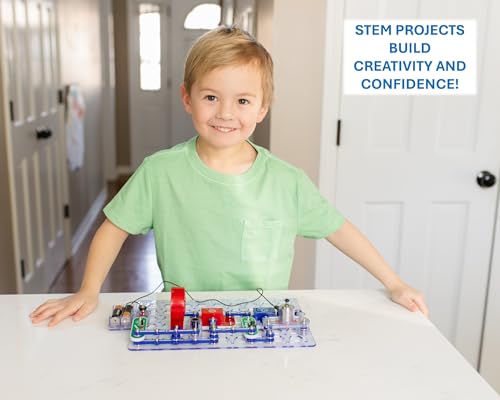
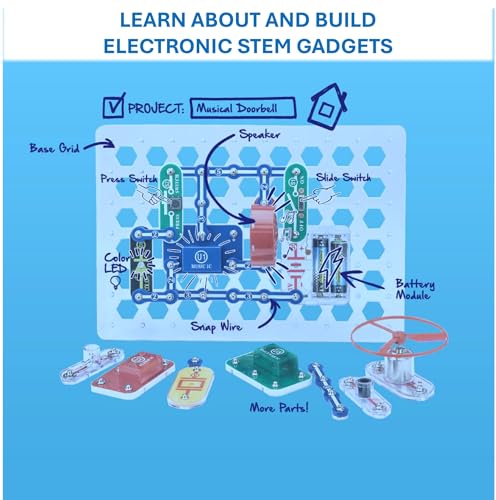
Snap Circuits Jr. SC-100 Electronics Exploration Kit, Over 100 Projects, Full Color Project Manual, 28 Parts, STEM Educational Toy for Kids 8 +
- SO MANY TOYS IN A SNAP: Make dozens of cool electronic gadgets - all from one box! A safe and fun way to intro
- PROJECTS THEY'LL LOVE: So many fun electric-powered projects you can make and play! Ages 8 to 108 will love bu
- GREAT GIFT Give the gift of learning and fun this holiday season! Snap Circuits kits will keep kids busy and h
Ages 10–12: Mechanical Thinking and Early Text-Based Coding
Pre-teens can handle more abstract reasoning and multi-step planning. They're ready to understand why code works, not just that it works. Mechanical coding — where physical wheels and levers encode instructions — is a powerful bridge to this abstraction.
3. The Research-Backed Benefits That Go Beyond the Screen
The academic case for coding education is now robust enough that over 35 countries have embedded it in their national school curricula — including the UK, Finland, Australia, and Singapore.
A landmark study by ScratchEd at Harvard Graduate School of Education (2019) found that children who engaged in creative coding projects showed measurably stronger outcomes in:
Coding and Emotional Resilience
One of the most underappreciated benefits of coding is what happens when things go wrong. Debugging — finding and fixing errors — is an inherently iterative, failure-tolerant process. Children who code regularly learn that failure is data, not defeat.
When kids learn to debug their code, they're also learning to debug their thinking — and that metacognitive skill transfers to every area of their lives.
— Karen Brennan, Associate Professor, Harvard Graduate School of Education (2019)
The CDC's developmental milestones framework highlights emotional self-regulation as a critical achievement of middle childhood (ages 6–12). Coding environments that reward persistence over perfection are one of the most effective and enjoyable ways to build this skill.
Coding and Mathematics
The National Council of Teachers of Mathematics (NCTM) has formally recognised computational thinking as a complementary strand to mathematical reasoning. Children who code show stronger performance in:
For families wanting to explore this maths-coding overlap without a screen, the Playz Coding & Computer Science Kit uses hands-on puzzles to teach binary numbers and pixel grids — concepts that sit at the intersection of art, maths, and computer science.
4. Choosing the Right Coding Tool: A Parent's Practical Guide
With hundreds of coding toys flooding the market, the most important question isn't "which is best?" but "which is best for my child, right now?"
What to Look for at Every Age
When evaluating any coding tool, run it through this quick checklist:
Screen-Free vs. Screen-Assisted
Not all coding tools require a screen, and for younger children or screen-time-conscious families, screen-free options are genuinely excellent:
- Unplugged activities (verbal algorithms, card sequencing): Ages 5+ - Mechanical coding robots (coding wheels, physical levers): Ages 8–10 - Electronics kits (circuit snapping, LED projects): Ages 8+ - Block coding + robotics (Scratch-based, app-controlled): Ages 8–12 - Arduino/text-based kits (real programming languages): Ages 10+
The Teach Tech Mech 5 Mechanical Coding Robot is a standout screen-free option for ages 10+. Children snap physical coding buttons onto a wheel to program the robot to throw, lift, kick, and draw — no app, no Wi-Fi, no screen. Pure mechanical logic.
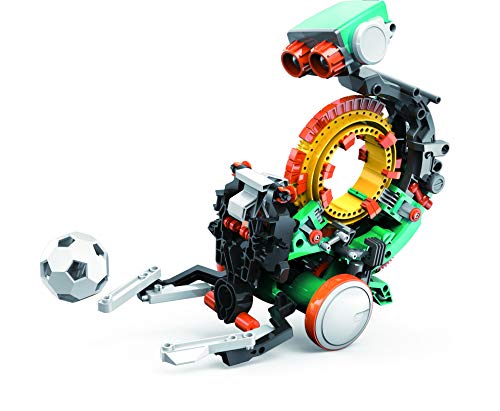


Teach Tech Mech 5, Mechanical Coding Robot, Coding Wheel Makes Robot Throw, Lift, kick, Draw and More, Ages 10 and Older
- Mech-5 is a one-of-a-kind Mechanical Coding Robot. This stem robot can throw, lift, kick, draw, and more, All
- This mission-based, entry level robot is designed to inspire young engineers to learn about mechanical enginee
- Build it. Code it. Watch it move!
The Family Bonding Dimension
Coding kits are most effective when parents participate — not as instructors, but as co-explorers. The BeAndge 6-in-1 STEM Kit is designed explicitly with this in mind, offering six different project types (including a bubble machine and a fiber lamp) that invite parents and children to build together. When children see you puzzling through a problem, they learn that not-knowing is the starting point for all discovery.
5. Robotics: Where Coding Becomes Tangible and Irresistible
Robotics is the single most effective on-ramp to sustained coding engagement for children aged 8–12, because it makes the invisible visible: your code moves something in the physical world.
Why Robots Work So Well
The Royal College of Paediatrics and Child Health (RCPCH) emphasises that screen time quality — not just quantity — is what matters for child development. Robotics coding sits at the highest-quality end of the spectrum because it is:
Entry-Level Robotics for Ages 8–10
The BeAndge 6-in-1 STEM Kit offers an accessible, affordable introduction to robotics principles — children build a reptile robot, a balance car, and more, learning about motors, sensors, and mechanical systems without needing any prior experience.
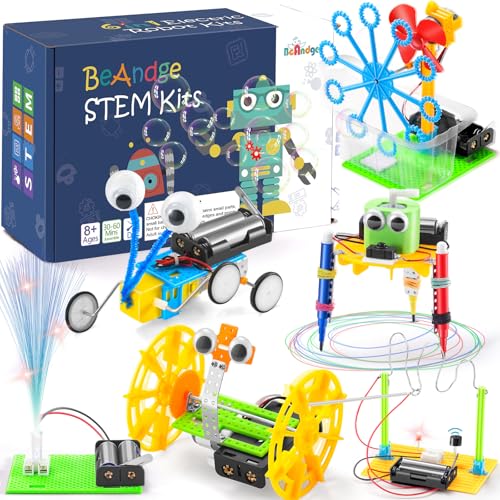
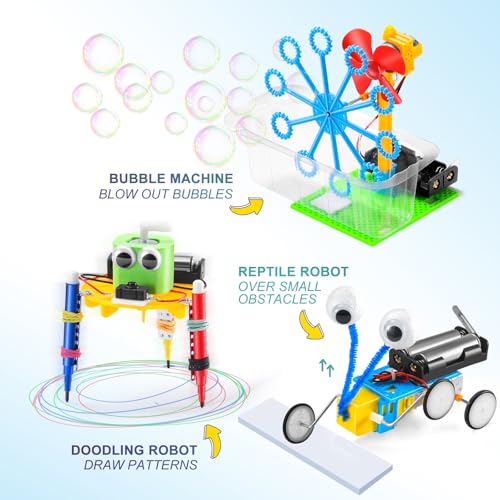

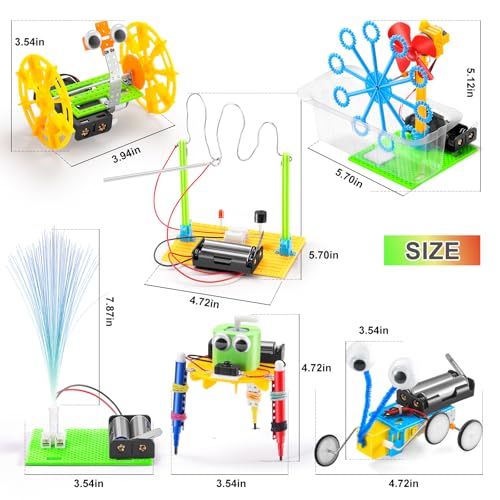
BeAndge STEM Kits for Kids Age 6-8 8-10 - Boy Gifts for 6 7 8 Year Old Boys Birthday Gift, STEM Toys for Age 8-13, Science Kits for Kids 5-7 8-12, Robotics Experiment Engineering Robot Building Crafts
- 6 IN 1 STEM KITS: These science experiments contain a reptile robot, a balance car, a bubble machine, a fiber
- FAMILY BONDING TIME: Doing scientific experiments together is a good way for parents and children to build a g
- UNIQUE GIFT IDEA: Our DIY robotic kits designed for kids age 8-12 are cool stuff for a budding inventor, very
Intermediate Robotics: Bridging to Real Programming
The Makeblock mBot Robot Kit is the gold standard at this level. Children build the robot themselves (assembly takes about 15 minutes), then program it using Scratch — the same block-based coding environment used in thousands of primary schools worldwide. As confidence grows, children can switch to Arduino (text-based C++ code) within the same platform. That seamless progression from beginner to advanced is rare and genuinely valuable.



Makeblock mBot Robot Kit, Robotics for Kids Ages 8-12 Learn to Code with Scratch & Arduino, STEM Toys Science Kits for Kids Age 8-12 Boys and Girls Age 8+
- Entry-level Coding Robot Toy: mBot robot kit is an excellent educational robot toys, designed for learning ele
- Easy to Build: With clearly building instructions, this building kit can be easily built within 15 minutes. Ki
- Rich Tutorials for Programming: With Offerring coding cards and lessons, children can easily use all fonctions
Advanced Robotics for Teens
For children 12 and older — or highly motivated 10–11-year-olds — the ELEGOO UNO R3 Smart Robot Car Kit represents a serious step up. Children assemble a fully functional robot car with obstacle avoidance, line-tracing, and infrared remote control, then program it using Arduino. This is the closest consumer product to what engineering students use in university labs.


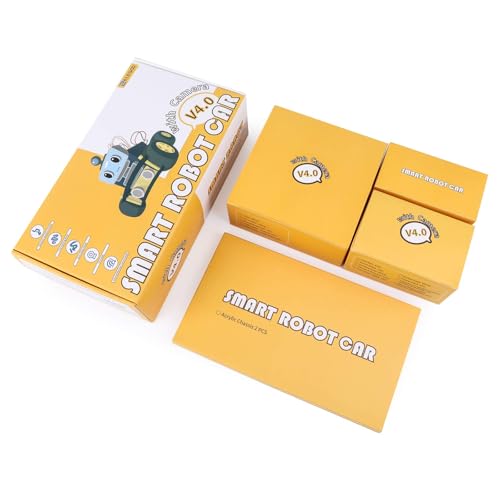

ELEGOO UNO R3 Smart Robot Car Kit V4 for Arduino Robotics for Kids Ages 8-12 12-16 STEM Science Kits Coding Gifts for 8 9 10 11 12 13 14 15 16 Year Old Boys Girls Teens Cool Engineering Building Toys
- ELEGOO Smart Robot Car: An educational STEM kit beginners (kids) to get hands-on experience about programming,
- Complete Package: Contains 24 kinds of module parts including obstacle avoidance, line tracing module, infrare
- Easy to Assemble: All the module interface has been modified with XH2. 54 ports as to make it much easier and
6. Making It Stick: How to Build a Coding Culture at Home
The biggest predictor of whether your child sustains coding engagement isn't the kit you buy — it's the environment you create around it.
The Three Pillars of a Coding-Friendly Home
1. Normalise failure loudly. When your child's circuit doesn't light up or their robot drives into the wall, say: "Brilliant — now we know one thing that doesn't work. What shall we try next?" This simple reframe shifts the emotional valence of failure from shame to curiosity.
2. Connect coding to what your child already loves.
The Teach Tech Mech 5 is perfect for sport-loving children — they can literally code the robot to kick a ball or throw an object, making the connection between their passion and the technology utterly concrete.
3. Celebrate process, not just product. Display your child's coding projects the same way you'd display a painting. Screenshot their Scratch programs. Photograph their assembled robots. Frame the journey as the achievement, not just the finished product.
How Schools and Home Can Work Together
If your child's school uses Scratch, Hour of Code, or Code.org, ask their teacher what level they're working at and match your home kit to that progression. The Makeblock mBot integrates directly with the Scratch platform used in most UK, US, and Australian primary schools — making it a seamless home extension of classroom learning.
Coding Approaches Compared: Finding the Right Fit
| Coding Approach | Best Age Range | Primary Benefits | Main Drawbacks | Recommended Product | Price Range |
|---|---|---|---|---|---|
| Unplugged / Screen-Free Concept Kits | 6–10 years | No screen time, builds foundational logic, great for visual learners | Limited progression ceiling | Playz Coding & Computer Science Kit | $25–35 |
| Electronics & Circuit Kits | 8–12 years | Teaches real electrical principles, instant visual feedback | No programming component | Snap Circuits Jr. SC-100 | $25–35 |
| Mechanical Coding Robots | 10+ years | Screen-free, tactile, bridges physical and digital logic | Less expandable than app-based kits | Teach Tech Mech 5 | $25–35 |
| Entry-Level STEM / Robotics Kits | 6–10 years | Affordable, family-friendly, diverse project types | Basic electronics only | BeAndge 6-in-1 STEM Kit | $15–20 |
| Block Coding + Robotics (Scratch-based) | 8–12 years | Bridges to real programming, school-compatible, expandable | Requires screen and batteries | Makeblock mBot Robot Kit | $65–75 |
| Arduino / Text-Based Robot Kits | 10–16 years | Real programming language, advanced STEM skills, impressive output | Steeper learning curve | ELEGOO UNO R3 Smart Robot Car Kit | $55–65 |
Expert Insights on Coding and Child Development
Frequently Asked Questions
Conclusion
Every time your child snaps a circuit together, watches a robot follow their instructions, or finally fixes the bug that was making everything go wrong, something remarkable is happening beneath the surface. They are learning that the world is programmable — that with the right thinking, patience, and creativity, they can make things happen. That belief, internalised early, is one of the most powerful gifts you can give them.
Coding won't make every child a software engineer. But it will make every child a sharper thinker, a more resilient problem-solver, and a more confident creator. And in a world that the World Economic Forum tells us will be defined by analytical and creative skills above all others, that is not a small thing.
The best time to start is today — and the second-best time is also today.
If this article helped you see coding differently, save it, share it with another parent, or subscribe to tinymindsworld.com for more research-backed guides to raising curious, capable kids.
Sources & References
- World Economic Forum. "Future of Jobs Report 2023." 2023. https://www.weforum.org/reports/the-future-of-jobs-report-2023
- American Academy of Pediatrics (AAP). "Media and Young Minds — Policy Statement." Pediatrics, 2016. https://publications.aap.org/pediatrics/article/138/5/e20162591/60503
- Resnick, Mitchel. "Lifelong Kindergarten: Cultivating Creativity Through Projects, Passion, Peers, and Play." MIT Press, 2017.
- Brennan, Karen & Resnick, Mitchel. "New frameworks for studying and assessing the development of computational thinking." ScratchEd, Harvard Graduate School of Education, 2012. https://scratched.gse.harvard.edu/ct/files/AERA2012.pdf
- National Council of Teachers of Mathematics (NCTM). "Catalyzing Change in Early Childhood and Elementary Mathematics." 2020. https://www.nctm.org
- Royal College of Paediatrics and Child Health (RCPCH). "The health impacts of screen time: a guide for clinicians and parents." 2019. https://www.rcpch.ac.uk/resources/health-impacts-screen-time-guide-clinicians-parents
- Centers for Disease Control and Prevention (CDC). "Child Development: Middle Childhood (6–8 years)." 2023. https://www.cdc.gov/ncbddd/childdevelopment/positiveparenting/middle.html
- Code.org. "About Code.org — Why Computer Science?" 2023. https://code.org/about
- Girls Who Code. "The State of Girls and Women in STEM." 2023. https://girlswhocode.com/research
- National Institute for Play. "Research — Play Science." Stuart Brown, MD. https://www.nifplay.org/science/research/
Frequently Asked Questions
At what age should my child start coding?
Does coding mean more screen time? I'm already worried about that.
My child gets frustrated easily — is coding right for them?
Is coding just for children who are good at maths?
What's the difference between a coding toy and a STEM toy?
How do I know if a coding kit is good quality and worth the money?
My daughter isn't interested in robots. How do I make coding appealing to her?
Was this helpful?
Thanks — your feedback helps us pick what to write next.