Why Coding Toys Matter More Than You Think (And What the Research Actually Says)
The best coding toys for kids match developmental stage to coding concept — screen-free robots like Botley work brilliantly from age 5, building sequencing and logic skills that research links to stronger maths and literacy outcomes.
In this article
Picture this: your child is lying on the floor, tongue poking out in concentration, pressing tiny buttons on a remote, watching a small robot trundle into a cardboard-box "house" they built themselves. No screen. No app. Just pure, joyful problem-solving. That moment? That's computational thinking in action — and it's happening earlier than most parents expect.
According to the World Economic Forum's Future of Jobs Report (2023), analytical thinking and creative problem-solving are the top two skills employers will need most by 2027. The foundation for both is laid in childhood, and coding toys are one of the most research-supported ways to build it.
In this guide you'll understand:
1. Why Coding Toys Matter More Than You Think (And What the Research Actually Says)
The most important thing to know is this: coding toys aren't about creating future software engineers — they're about building the thinking habits every child needs.
The American Academy of Pediatrics (AAP) has consistently emphasised that high-quality play involving problem-solving, cause-and-effect exploration, and social collaboration is essential for healthy cognitive development in children aged 2–8. Physical coding robots sit squarely in that category. Unlike passive screen-based apps, they require a child to form a plan, execute it, observe the result, and adjust — a loop that cognitive scientists call the "predict-observe-explain" cycle.
Children learn best through hands-on, active, minds-on play. When children engage with physical objects to solve problems, they are building the executive function skills that underpin all future academic learning.
— American Academy of Pediatrics, Council on Communications and Media (2016)
What "Computational Thinking" Actually Means for a 5-Year-Old
Computational thinking sounds intimidating, but its four pillars are deeply child-friendly:
- Sequencing — putting steps in the right order (forward, forward, turn right) - Decomposition — breaking a big problem into smaller ones - Pattern recognition — noticing that the same move solves similar puzzles - Abstraction — focusing on what matters and ignoring what doesn't
A child directing a robot through an obstacle course is practising all four simultaneously — without knowing it.
2. Screen-Free Coding: Why No Tablet Is a Feature, Not a Limitation
Screen-free coding toys are better for under-8s not because screens are inherently bad, but because physical manipulation supports deeper learning at this developmental stage.
The CDC's developmental milestones remind us that children aged 3–7 are in a critical window for fine motor development, spatial reasoning, and cause-and-effect understanding — all of which are more powerfully activated by physical objects than by touchscreens. When a child presses a button on a remote programmer and watches a robot respond in the real world, the feedback loop is immediate, three-dimensional, and deeply satisfying.

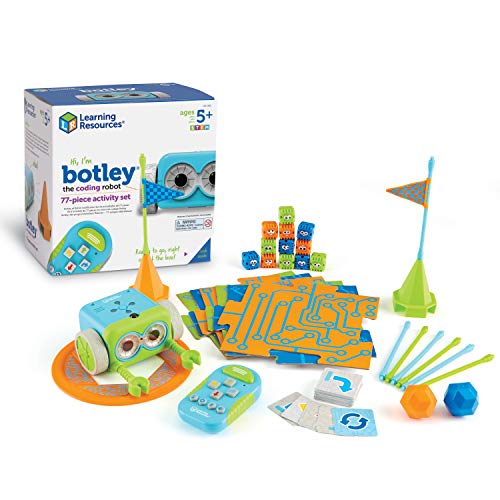


Learning Resources Botley The Coding Robot Activity Set - 77 Pieces, Ages 5+, Screen-Free Coding Robots for Kids, STEM Toys for Kids, Programming for Kids, for Kids
- EARLY STEM SKILLS: Botley helps your child learn early STEM skills while playing and having fun. He teaches ki
- READY RIGHT OUT OF THE BOX: Botley is ready to code right out of the box! Have 5 AAA batteries and a Phillips
- SCREEN-FREE: Botley features completely screen-free coding: no phone or tablet required. Botley's easy-to-use
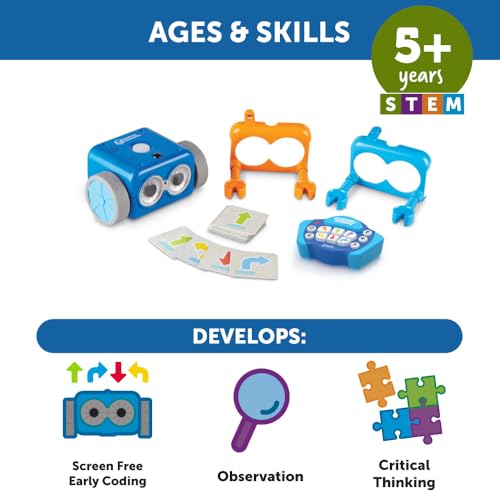
The Botley The Coding Robot Activity Set (77 Pieces) is one of the most popular screen-free options on the market for good reason. It requires zero tablets or smartphones — the remote programmer is a standalone device that sends commands directly to Botley. For parents managing household screen time, this is a genuine relief.
What Makes Screen-Free Better for This Age Group
The Botley the Coding Robot (STEM Gift Set) version offers the same screen-free experience with 80-step programming capabilities and obstacle detection, making it an excellent entry point for families who want room to grow without buying a second toy.
3. Age-by-Age Guide: Matching Coding Concepts to Developmental Readiness
The right coding toy at the wrong age is just a frustrating toy — so developmental match matters enormously.
Child development frameworks from organisations like the NAEYC (National Association for the Education of Young Children) emphasise that abstract thinking develops gradually through middle childhood. Before age 7, children are largely in Piaget's "pre-operational" stage — they think concretely, learn by doing, and need immediate feedback. After 7, they move into "concrete operational" thinking, where they can hold multi-step sequences in mind and begin to understand loops and conditionals.
Ages 4–5: Pre-Coding Foundations
At this age, children aren't ready for true sequencing toys, but they're building the foundations. Focus on: - Directional language (forward, back, left, right) - Simple cause-and-effect toys - Building and construction play
Best approach: Introduce the language of coding through play — narrate your own actions in steps. "First I pick up the cup, then I walk to the sink, then I turn on the tap."
Ages 5–7: Perfect for Screen-Free Robot Coding
This is the sweet spot. Children this age can hold 4–6 step sequences in working memory, understand that a mistake means "try again differently," and are motivated by a robot that visibly responds to their instructions.
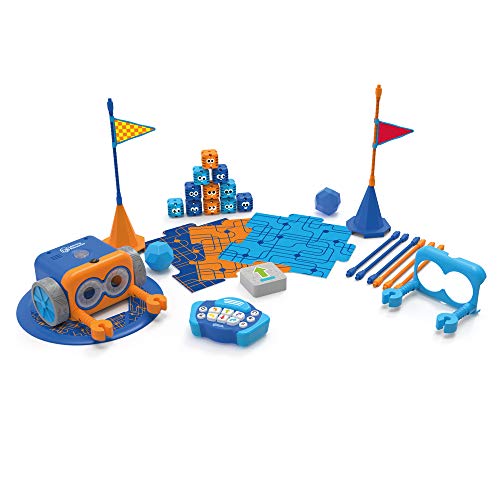


Learning Resources Botley The Coding Robot 2.0 Activity Set - 78 Pieces, Ages 5+, Coding Robot for Kids, STEM Toys for Kids, Early Programming and Coding Games for Kids
- Coding Toys for Kids: Code right out of the box with the next generation of our Toy of the Year winning coding
- Discover Coding for Kids: 16 fun interactions—transform Botley 2.0 into a train, police car, ghost, and more!
- Expanded Coding Styles: Features expanded coding styles—code through music, lights, and movements!
The Botley 2.0 Activity Set (78 Pieces) is purpose-built for this window. Its 16 fun interactions — transforming Botley into a train, police car, or ghost — keep 5–7-year-olds engaged across dozens of sessions, not just one afternoon.
Ages 8–10: Adding Complexity and Chain Reactions
By 8, children are ready for multi-variable thinking. They can plan ahead, predict outcomes, and enjoy the challenge of a sequence that almost worked.
Ages 10–12: Transition to Text-Based Coding
At this stage, physical robots become a bridge to Scratch, Python and beyond. The sequencing logic they've practised with robots maps directly onto programming syntax.
4. Deep Dive: The Botley 2.0 Range — What's Actually Different Between Each Version
Parents frequently ask: "There seem to be several Botley versions — what's the actual difference?" It's a fair question, and the answer matters for your budget.
The core Botley coding experience — screen-free remote programmer, obstacle detection, sequencing challenges — is consistent across the range. What differs is the number of accessories, the complexity of interactions, and the intended setting (home vs. classroom).

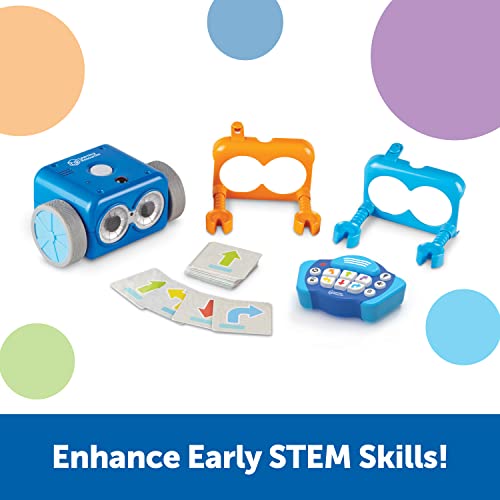
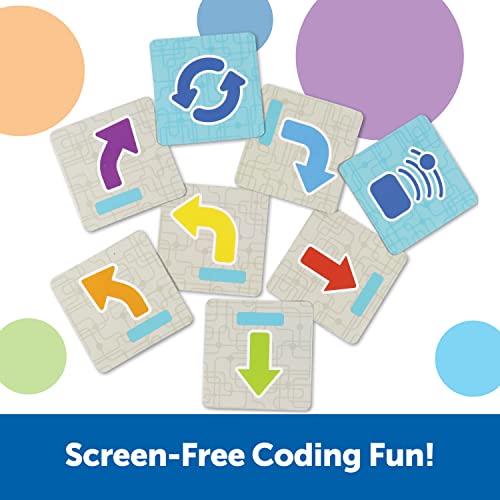

Learning Resources Botley the Coding Robot 2.0 - STEM Toys, Programming for Kids, Electronic Screen-Free Toys, Critical Thinking, Ages 5+,46 pieces
- LEARN WHILE YOU PLAY: Botley helps your child learn early STEM skills while playing and having fun. He teaches
- READY TO GO RIGHT OUT OF THE BOX: Botley is ready to code right out of the box! Have 5 AAA batteries and a Phi
- SCREEN FREE PLAYING TIME: Botley features completely screen-free coding: no phone or tablet required. Botley's
The Botley 2.0 (46 Pieces) is the most affordable entry point into the 2.0 range. It includes the upgraded robot with music, lights, and movement coding — a significant step up from the original — but with a smaller accessory set. For families who want to try before committing to the full set, this is the smart starting point.
Version-by-Version Breakdown
Original Botley (77-piece set): The Botley Original Activity Set remains a strong choice for families who don't need the 2.0 upgrades. The core sequencing and obstacle-detection features are identical, and the 77-piece accessory set provides months of varied play. At a lower price point, it's excellent value.
Botley 2.0 (46-piece set): The Botley 2.0 46-Piece Set adds expanded coding styles — music, lights, movement transformations — which meaningfully increase engagement for children who've outgrown the original's interactions.
Botley 2.0 (78-piece set): The Botley 2.0 78-Piece Activity Set is the flagship home version. The larger accessory set supports more complex obstacle courses and longer coding sequences, keeping an 8-year-old challenged well beyond what the 46-piece set offers.
5. The Chain Reaction Add-On: Turning Coding Into Physics Discovery
The most underrated product in the Botley range is the accessory pack — and it's the one most parents overlook.
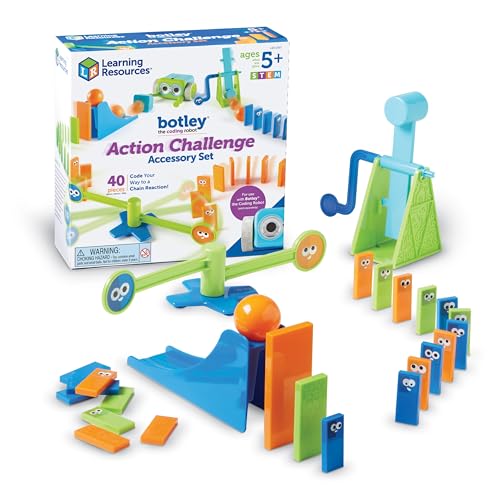
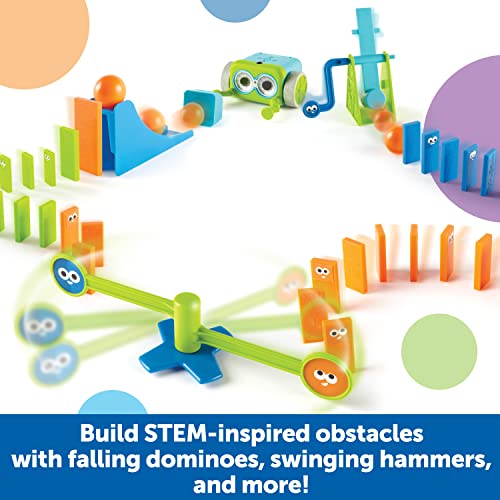
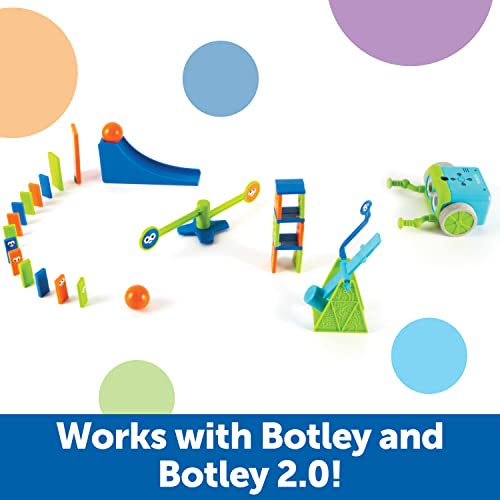
Learning Resources Botley Coding Robot Kit Action Challenge Set, Chain Reaction Game STEM Robot Accessory Pack for Coding Robots for Kids Ages 5 and Up
- WHAT'S INCLUDED: This add-on accessory kit pairs with your existing Botley or Botley 2.0 coding robot (each so
- CHAIN-REACTION STEM DISCOVERY PLAY: Turn this chain reaction kit into a hands-on STEM robot kit adventure as k
- ADD-ON ACCESSORY KIT: This 40-piece robot kit add-on includes a hammer, gate, ramp, 2 balls, dominos, cup, det
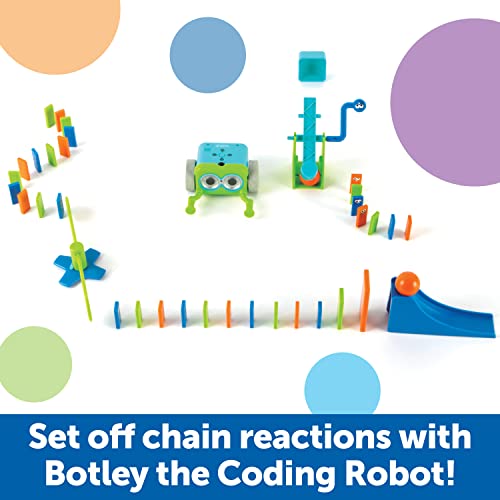
The Botley Coding Robot Action Challenge Set is a 40-piece add-on that transforms Botley missions from "reach the target" into genuine Rube Goldberg-style chain reactions. A hammer knocks over dominoes, a ball rolls down a ramp, a gate opens — all triggered by Botley's precisely coded path.
This matters developmentally because chain reactions introduce systems thinking — the understanding that one event causes another, which causes another. This is the conceptual bridge between simple sequencing and genuine programming logic (think: functions calling other functions).
Play that involves cause-and-effect chains — where children must predict and sequence multiple linked outcomes — is among the highest-order cognitive play available to primary-age children.
— NAEYC, "Developmentally Appropriate Practice in Early Childhood Programs," (2022)
What's in the Box
Who It's Best For
This add-on is ideal for children who've mastered basic Botley sequences and need a new challenge — typically 7–10-year-olds. It's also a brilliant birthday gift for a child whose family already owns a Botley, since it extends the life of a toy they already love.
6. Botley in the Classroom: When One Robot Isn't Enough
For teachers, after-school coordinators, and parents running coding clubs, the classroom set changes the economics entirely.
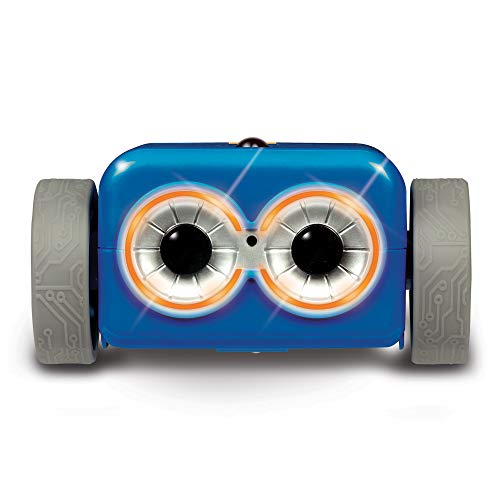
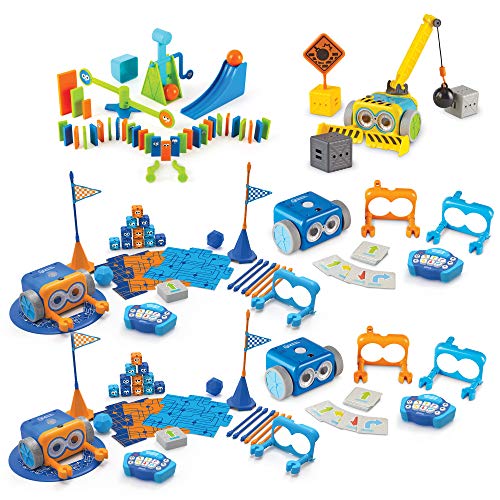
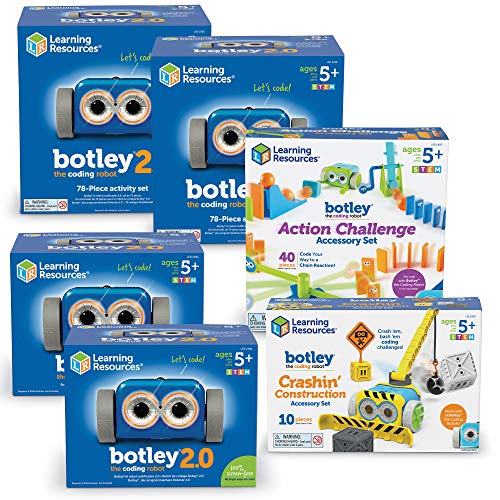
Learning Resources Botley 2.0 The Coding Robot Classroom Set - Elementary STEM Toys, Robotics Kits for Kids age 5-7, Teach Critical Thinking, Coding Bot for Boys and Girls
- SCREEN--FREE CODING MADE EASY - Give students hands-on practice with Botley 2.0, the toy coding robot that tea
- CLASSROOM STEM LESSONS - Designed for whole?class engagement, this coding robotics kit includes two robots plu
- BUILT FOR YOUNG LEARNERS - Created specifically for early elementary learners, this coding robot kit helps chi
The Botley 2.0 Classroom Set includes two complete robots plus two full 78-piece activity sets — everything needed to run STEM rotations, small-group coding labs, or after-school clubs. At $309.19, it's a significant investment, but the per-student cost across a classroom quickly becomes competitive with individual sets.
Why Two Robots Matter
The single biggest limitation of a one-robot classroom activity is wait time. Children disengage during long waits for their turn. Two robots allow: - Side-by-side competitive coding challenges ("whose robot reaches the target in fewer steps?") - Collaborative problem-solving with one robot each - Differentiated tasks — one group on basic sequences, one on loops
Designed for Neurodiverse Learners
Learning Resources explicitly notes that the classroom set is designed for neurodiverse learners, and this deserves emphasis. The concrete, predictable cause-and-effect of robot coding is particularly well-suited to children with ADHD, autism spectrum conditions, and dyslexia. There's no reading required to start, no ambiguity in feedback, and the physical activity of building obstacle courses provides sensory engagement alongside cognitive challenge.
| Coding Toy Option | Best Age Range | Primary Benefits | Main Drawbacks | Recommended Product | Price Range |
|---|---|---|---|---|---|
| Botley Original (77-piece) | 5–8 years | Screen-free, large accessory set, proven sequencing logic | No music/lights interactions of 2.0 | Botley Original Activity Set | $54–65 |
| Botley 2.0 (46-piece) | 5–8 years | Upgraded interactions (music, lights, movement), affordable entry to 2.0 | Smaller accessory set limits course complexity | Botley 2.0 46-Piece Set | $58–60 |
| Botley 2.0 (78-piece) | 5–10 years | Most complete home set, 16 interactions, extended challenge life | Higher price point | Botley 2.0 78-Piece Set | $77 |
| Botley Original (STEM Gift Set) | 5–9 years | 80-step programming, obstacle detection, immediate out-of-box use | Fewer accessories than activity sets | Botley STEM Gift Set | $54 |
| Action Challenge Add-On | 7–10 years | Chain-reaction physics, extends existing Botley, best value upgrade | Requires existing Botley robot | Botley Action Challenge Set | $19 |
| Botley 2.0 Classroom Set | 5–7 years (group) | Two robots, full sets, designed for neurodiverse learners, group play | High upfront cost, overkill for single child | Botley 2.0 Classroom Set | $309 |
Expert Insights on Coding Toys and Child Development
The Bigger Picture
There's a moment — and if you've watched a child with a coding robot, you've seen it — where the robot does exactly what they planned, and their face goes completely still for a second before the grin arrives. That stillness is the moment of genuine understanding: I made that happen. I figured it out.
That feeling — of being capable, of being a thinker, of having power over a problem — is what coding toys are really giving your child. Not a head start in tech. A belief in their own competence.
The best coding toy isn't the most expensive one or the one with the most pieces. It's the one your child picks up again tomorrow. Start where they are, give them a mission, and get out of the way.
If this guide helped you, save it for when the next birthday rolls around — and share it with the parent who's still buying another screen-based game.
Sources & References
- World Economic Forum. "Future of Jobs Report 2023." 2023. https://www.weforum.org/reports/the-future-of-jobs-report-2023/
- American Academy of Pediatrics, Council on Communications and Media. "Media and Young Minds." Pediatrics, 138(5). 2016. https://doi.org/10.1542/peds.2016-2591
- Grover, S., & Pea, R. "Computational Thinking in K–12: A Review of the State of the Field." Educational Researcher, 42(1), 38–43. 2013. https://doi.org/10.3102/0013189X12463051
- National Association for the Education of Young Children (NAEYC). "Developmentally Appropriate Practice in Early Childhood Programs Serving Children from Birth Through Age 8." 4th edition. 2022. https://www.naeyc.org/resources/position-statements/dap
- Centers for Disease Control and Prevention (CDC). "Developmental Milestones." 2023. https://www.cdc.gov/ncbddd/actearly/milestones/index.html
- Bers, Marina Umaschi. "Coding as a Playground: Programming and Computational Thinking in the Early Childhood Classroom." Routledge, 2018.
- Brown, Stuart. "Play: How It Shapes the Brain, Opens the Imagination, and Invigorates the Soul." Avery/Penguin, 2009.
- Learning Resources. "Botley 2.0 The Coding Robot — Product Information." 2024. https://www.learningresources.com
Frequently Asked Questions
At what age can my child start using a coding robot like Botley?
Is screen-free coding actually better than coding apps for kids?
What's the difference between Botley and Botley 2.0?
Can coding toys help children with ADHD or autism?
Do I need to buy accessories, or is the basic Botley set enough?
How do I keep my child engaged with a coding toy after the initial excitement fades?
Are Botley toys worth the price compared to coding apps, which are often free?
Was this helpful?
Thanks — your feedback helps us pick what to write next.